How we test RunsOn on real repos
The rules behind our repo tests: what we change, which GitHub runner we compare against, the two clocks we read, and what goes into cost per run.
 Sujoy Singh
Updated on 19 Oct 2026: we now measure cold, warm and warm-with-a-change runs.
Setting up and running a compute benchmark is somewhat trivial these days as an agent can quickly set up a harness and start running workloads fairly well. Which is why just just having benchmarks is not valuable anymore, how and what you benchmark is.
This post is about one kind of benchmark: the repo tests on this blog. We take a real open-source project, like FreeCAD, spotify-player or Omarchy, run its own workflow on GitHub’s runners and on RunsOn, and compare the two.
It’s not how /benchmarks works. That page runs the same fixed Rust, TypeScript and Docker builds on GitHub, RunsOn and other CI providers like Blacksmith, Namespace and WarpBuild, and it follows its own methodology.
Benchmarking CI runner compute for a given workflow really comes down to these 3 things:
- is the cache cold, warm, or warm with a code change
- are we counting total run time or just execution time
- which runner config is the baseline
Every repo test ends up as a report on this blog, and these are the rules we follow for all of them:
We only compare runner machines, most of the time#
Since GitHub has different configs for public and private repos, we usually fork a repo publically and privately (or make a private copy) so that we can run the same workloads with both. Moreover:
- A public repo gets a 4 vCPU runner for free.
- A private repo gets a 2 vCPU runner you pay for.
The only change we make in the workflow is the runs-on: label. Sometimes there might be further optimisations in the workflow we want to show, so we show a diff in the report for that.
Each comparable GitHub runner has the same shape#
Since most these repos are public, we compare a 4CPU-16GB RunsOn runner with a GitHub Large 4CPU-16GB runner so that we can compare both the performance and the price. GitHub Large runners are always charged irrespective and equal in performance to the public 4CPU-16GB runners so the comparison is fair.
| RunsOn runner | GitHub baseline | GitHub price |
|---|---|---|
| EC2 General Purposed 2 vCPU / 8 GB | ubuntu-latest in a private repo | $0.006/min |
| EC2 General Purposed 4 vCPU / 16 GB | 4 vCPU larger runner | $0.012/min |
We usually use the latest generation general-purposed M family of EC2 instances for our benchmarks.
Cache: Cold, warm, and warm with a change#
We measure each runner in up to three cache states:
- Cold: nothing is restored, like the first run on a new branch or after the cache key changes.
- Warm: the cache comes from an earlier run of the same commit, so there’s almost nothing left to rebuild.
- Warm with a change: a warm cache plus a small source change, so the build recompiles what changed. This is closest to a normal push.
The run that primes the cache is never counted, the change is the same patch on every runner, and both sides use the same cache backend. If a workflow has no cache, every run is cold and the report says so.
Both queue and execution times are compared#
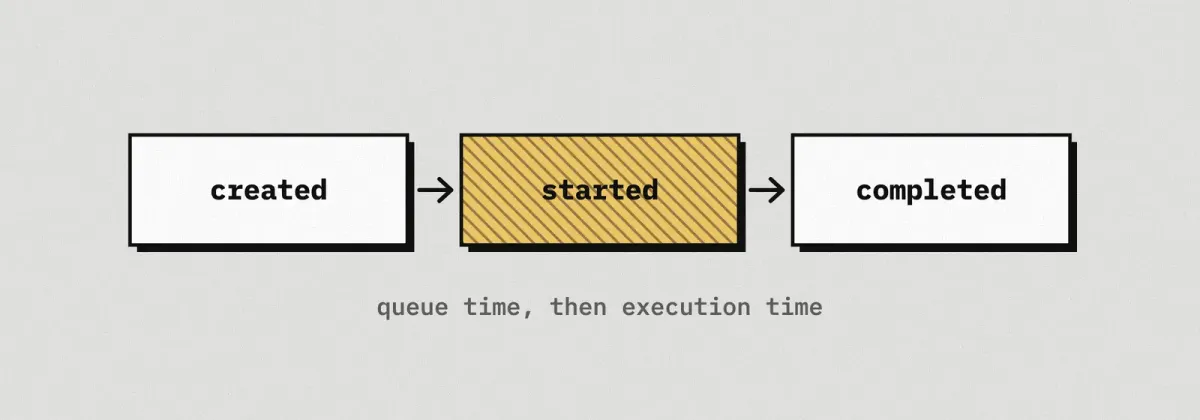
GitHub gives every job three timestamps: created, started, completed. “Job execution”, the number on the run page, only starts when a runner picks the job up. Everything before that is queue.
We read and compare both.
Anything that happens before the runner takes the job, like booting the machine or preparing it, shows up as queue and not as execution.
How many runs#
We usually do 3-5 runs for each config and cache state, and report the average.
Spot and on-demand runs of the same instance type count as the same machine for timing, they only differ in cost.
Cost per run#
Both sides are list prices in us-east-1, with no credits, discounts or included minutes.
GitHub = job minutes, rounded up per job × the runner's per-minute rateRunsOn = minutes the instance is billed × (EC2 + root volume + public IPv4)GitHub rounds every job up to a whole minute, so we do too.
On RunsOn the bill starts when the instance does, not when the job does, so the billed time is queue plus execution. These are the fixed costs wrt AWS:
- EC2: the on-demand list price, or the Spot price that was in effect when the run happened. The post says which. We never apply a “70% off” rule of thumb.
- Root volume: the RunsOn default, 30 GB of gp3 at 400 MB/s. That is $13.40 a month, or about $0.0003 for every minute the runner exists.
- Public IPv4: $0.005 an hour.
On a small Spot instance the disk and the IP are a real share of the bill, which is why we count them.
There are cases when we are comparing or showcasing different features like ECR cache, sticky disks etc. They incur separate costs and are mentioned in the report.
The costs we leave out of the report#
The RunsOn license and the control plane are a fixed monthly bill that does not change with one more run, so they are not in a per-run number. They start with around $36/month for a small team, and this post works out the job volume where they break even.
Cache and artifact storage are left out on both sides too, unless explicitly mentioned in the report.