Networking
Shared networking model for RunsOn Flex and Fleet: VPCs, public and private runners, static egress, SSH, SSM, WAF, and ingress differences.
RunsOn networking is about where the control plane and runner instances live, how runners reach the internet and private services, and which product needs public ingress.
Usage#
Flex
For Flex static egress, launch the job in private networking so outbound traffic exits through the stack NAT gateway (assuming you enabled private networking support on the stack):
jobs: deploy: runs-on: runs-on=${{ github.run_id }}/runner=2cpu-linux-x64/private=trueFleet
For Fleet, private networking is configured in Terraform. Enable private networking support on the stack, then mark the runner fleet definitions that should launch in private subnets:
module "runs_on_fleet" {  private_mode       = "true"  vpc_id             = module.vpc.vpc_id  public_subnet_ids  = module.vpc.public_subnets  private_subnet_ids = module.vpc.private_subnets
  runners = {    deploy-static-ip = {      cpu     = 2      family  = ["m8", "r8"]      image   = "ubuntu24-full-x64"      private = true    }  }
  fleets = {    deploy = {      runner = "deploy-static-ip"    }  }}
See Static IPs, Remote access, and Security for the full network controls.
VPC models#
Flex can use the built-in CloudFormation networking path for the fastest install. In v3, that path always creates an embedded VPC as part of the RunsOn stack. It does not swap between embedded and external networking.
The built-in CloudFormation topology includes:
- default VPC CIDR
10.1.0.0/16(configurable before the VPC is created) - a fixed two-AZ layout
- public subnets for the control plane path
- optional private runner subnets when private networking is enabled
- a built-in S3 gateway VPC endpoint
- a RunsOn-managed public ingress WAF when
EnableWAF=true
The built-in template does not create EC2 or ECR interface VPC endpoints. If private runners need PrivateLink access to those services, manage the endpoints with Terraform / OpenTofu or your own networking stack.
Custom networking and existing VPCs#
Use Terraform / OpenTofu instead of the built-in CloudFormation template when you need to:
- reuse an existing VPC
- control your own subnet, NAT, endpoint, or route-table design
- attach a user-managed public ingress Web ACL
- apply infrastructure-level controls such as IAM permission boundaries
- add EC2, ECR, or other interface VPC endpoints
Fleet is Terraform-first. You provide VPC and subnet inputs, then decide whether the worker and runner fleets use public or private subnets.
If you previously used the v2 CloudFormation NetworkingStack=external path with ExternalVpc* parameters, treat the v3 change as a migration. The built-in v3 CloudFormation template no longer supports that external-networking mode; move those installs to Terraform / OpenTofu instead of trying to preserve the old CloudFormation shape.
Public and private runners#
Public runners are simpler and usually cheaper because they do not need NAT for outbound internet access. Private runners are useful when jobs must reach private services or use a stable egress IP, but NAT gateways add hourly and data processing cost.
Static egress IPs come from routing private runner traffic through NAT gateways with Elastic IPs. Use them when third-party systems require IP allow lists.
Flex controls private runner placement from the stack Private setting and, when mixed public/private mode is allowed, from the per-job private label. Fleet uses private_mode for the worker and runner default, plus private = true or private = false on individual runner definitions.
Fleet private_mode accepts:
false: use public subnets.true: run the Fleet worker privately and allow private runner fleets.always: run the Fleet worker privately and make private runners the default, unless a runner fleet opts out.only: run the Fleet worker and runners privately.
For Fleet, the Terraform module needs a VPC and at least one public subnet, and it can also use private subnets for private networking. Start with public subnets when you want the smallest installation surface:
vpc_id = var.vpc_idpublic_subnet_ids = var.public_subnet_idsEnable private mode when the Fleet worker should use private subnets, and when runner fleets should be able to use private subnets:
private_mode = "true"private_subnet_ids = var.private_subnet_idsWith private_mode = "true", runner fleets stay public by default. Add private = true to the runner definition used by a fleet when that fleet should launch runners in private subnets:
runners = {  deploy-x64 = {    cpu     = 2    family  = ["m8", "r8"]    image   = "ubuntu24-full-x64"    private = true  }}
fleets = {  deploy = {    runner = "deploy-x64"  }}
See Static IPs for the Flex and Fleet examples.
Access and hardening#
SSM is the preferred console path for runner debugging. SSH can be enabled, restricted by CIDR, or disabled, depending on the product and stack settings.
Security groups should be treated as product boundaries. If two workloads need different inbound, outbound, or private-service access, put them in separate Flex environments, separate Fleet runner fleets, or separate stacks.
For Fleet, leave security_group_ids empty when you want the module to create the worker and runner security group:
security_group_ids = []Pass existing security groups when your platform team already owns network policy:
security_group_ids = [aws_security_group.ci_runners.id]When the module creates the security group, ssh_allowed and ssh_cidr_range control SSH ingress:
ssh_allowed = falsessh_cidr_range = "10.0.0.0/8"Runner IAM (Fleet)#
Use runner IAM and tags as part of the same boundary; use separate runner fleets or stacks when IAM permissions, network reachability, or cost ownership differs. Fleet creates the runtime and runner IAM roles. Use these inputs when your AWS organization enforces additional guardrails:
permission_boundary_arn = aws_iam_policy_boundary.ci.arnrunner_custom_policy_arns = [aws_iam_policy.runner_extra.arn]enable_bedrock = trueenable_bedrock grants runner instances access to Amazon Bedrock. Use it only for runner fleets that should run AI-assisted workloads.
IPv6 (Fleet)#
Fleet can enable IPv6 on runner launch templates when the selected subnets already support IPv6 addressing:
ipv6_enabled = trueThis adds IPv6 addresses to runner launch templates. The module does not create IPv6 VPC or subnet configuration for you.
Tags (Fleet)#
Fleet imports the Flex cost-allocation pattern. AWS resources receive stack tags, and launched runners can receive custom tags:
cost_allocation_tag = "stack"tags = {  owner = "ci-platform"}
runner_custom_tags = [  "cost-center=engineering",  "service=github-actions",]
Fleet also adds Fleet identity tags to launched runners so operators can distinguish fleet name and target scope from generic stack ownership.
Flex vs Fleet#
Flex is webhook-driven; Fleet is pull-based. Flex can select private networking, disk, and many runner traits from a workflow label; Fleet makes those choices in Terraform. Put network and IAM differences into separate runner fleets or separate Fleet stacks when access policy or blast radius must differ. The networking-level consequences are below — for the full security boundary (WAF, runner-group access policy), see Security: how jobs reach your account.
| Aspect | Flex | Fleet |
|---|---|---|
| Direction | Push — GitHub → stack | Pull — fleetd → GitHub |
| Public endpoint | API Gateway + Lambda webhook ingress | None |
| What to harden | Public ingress + admin routes (EnableAdminRoutes=false) | Outbound egress from fleetd to GitHub and AWS APIs |
| VPC model | Embedded VPC (default) or Terraform / OpenTofu BYO VPC | Terraform-first, BYO VPC |
VPC peering#
VPC peering is Flex-only.
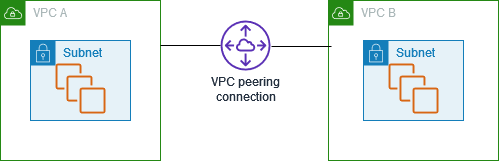
At installation time, Flex creates a new VPC and subnets in the region you selected. Sometimes you have existing (private) resources in another VPC, and you want runners launched by RunsOn to reach them (for example a Kubernetes cluster or internal services). This is where VPC peering comes in.
AWS provides a (free) service called VPC peering ↗ that connects two VPCs together. Until v2.5.0 you had to do this manually or with something like Terraform, but RunsOn provides a CloudFormation template that sets up VPC peering between RunsOn’s VPC and your existing VPC.
Select the region (v2 only)#
The quick-create flow below works only against v2 stacks; on v3 it fails with unresolved Fn::ImportValue errors (see the note above). To get started on a v2 stack, select the region where your existing RunsOn stack resides. This will redirect you to the CloudFormation interface:
Fill in the CloudFormation stack parameters#
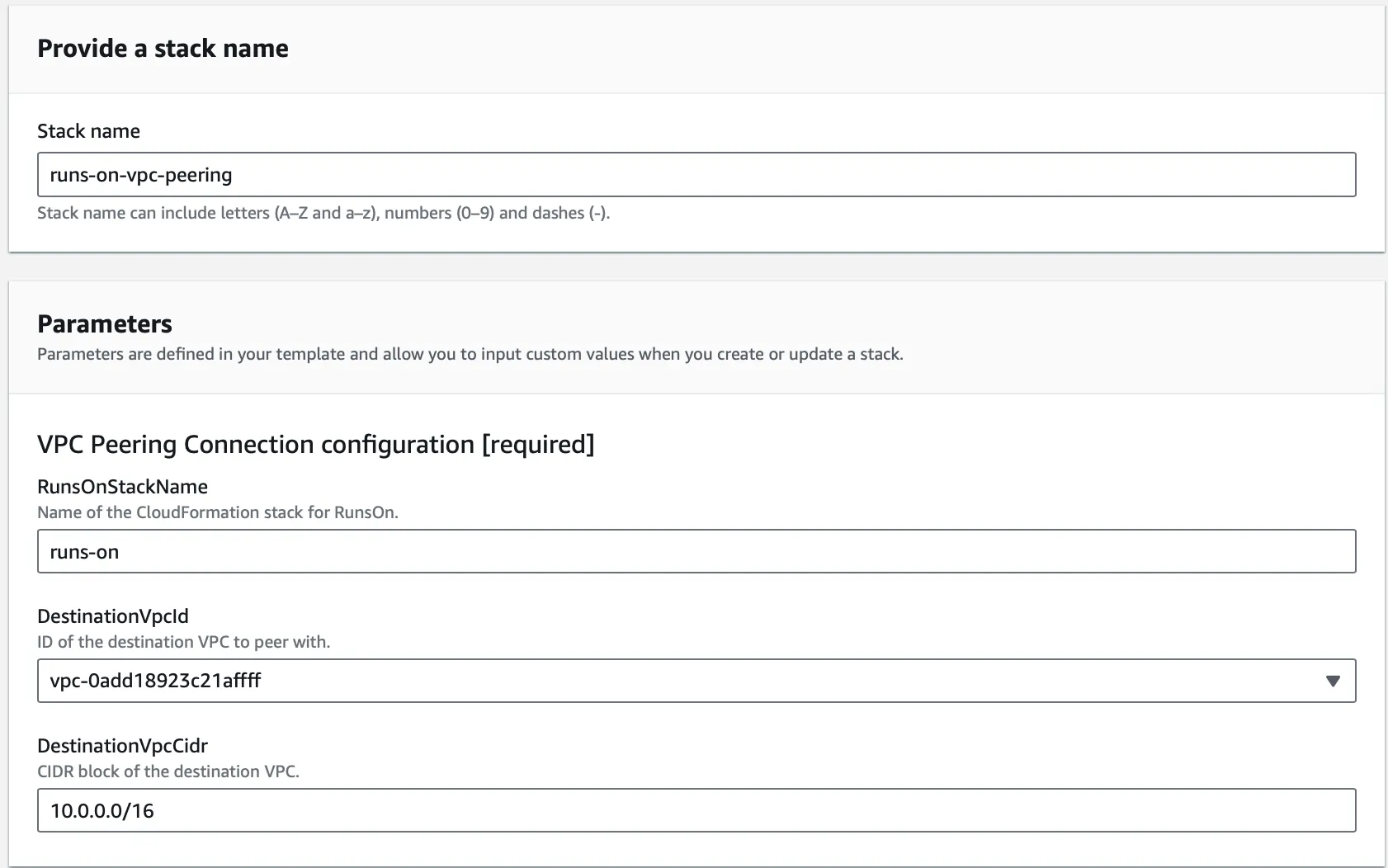
The CloudFormation stack accepts 3 parameters:
-
RunsOnStackName:
- Type: String
- Description: “Name of the existing CloudFormation stack for RunsOn.”
- Default: “runs-on”
-
DestinationVpcId:
- Type: AWS::EC2::VPC::Id
- Description: “ID of the destination VPC to peer with.”
-
DestinationVpcCidr:
- Type: String
- Description: “CIDR block of the destination VPC.”
- Default: “10.0.0.0/16”
Once you have filled in the parameters, click the “Create stack” button. It will add the necessary routes to your existing RunsOn VPC to allow the runners to reach your private resources.
Create a route back to RunsOn VPC in your existing VPC#
The only manual step left is to create a route in the route tables of your existing VPC so that traffic can flow back from your private resources to the runners in RunsOn VPC:

If you want to automate the route creation (for example with Terraform or a script), use the following values:
RunsOnVpcPeeringConnectionId, exposed by the VPC peering stack.- the RunsOn VPC CIDR. For the built-in v3 CloudFormation path this defaults to
10.1.0.0/16(or whateverVpcCidrBlockyou set at install). If you deploy RunsOn with Terraform or other custom networking, use the CIDR from that environment instead.
As an example, you can then use the following AWS CLI command to create the route:
aws ec2 create-route --route-table-id <your-route-table-id> --destination-cidr-block 10.1.0.0/16 --vpc-peering-connection-id <vpc-peering-connection-id>