Remote access (SSM and SSH)
Use SSM and optional SSH access to troubleshoot RunsOn Flex and Fleet runner instances.
RunsOn provides SSM access to runner instances, plus optional SSH access when you explicitly enable it. SSM is the preferred troubleshooting path because it avoids opening inbound SSH access.
Availability#
SSM and SSH access work on Linux and Windows runners, with both Flex and Fleet. Official runner images include the SSM agent. RunsOn starts the platform SSH service only when SSH access is enabled.
Usage#
Flex
For Flex, SSH has two controls:
SSHAllowedandSSHCidrRangeon the stack decide whether inbound SSH is allowed and from where.- The per-job
sshlabel decides whether the SSH daemon starts for a runner.
jobs: debug: runs-on: runs-on=${{ github.run_id }}/runner=2cpu-linux-x64/ssh=trueFleet
For Fleet, SSH ingress is controlled by Terraform when the module creates the security group. The module defaults are ssh_allowed = true and ssh_cidr_range = "0.0.0.0/0". Set ssh_allowed = false to disable inbound SSH entirely, or narrow ssh_cidr_range (e.g. your VPN range) to restrict it:
ssh_allowed = falsessh_cidr_range = "10.0.0.0/8"If you pass security_group_ids, your platform-owned security groups decide the inbound policy instead.
SSM access availability#
The SSM agent is always enabled on official images. You can connect using the AWS console, the AWS CLI, or the RunsOn CLI.
You must ensure that your AWS profile has the necessary permissions to access the SSM service.
Connecting using the AWS CLI#
# AWS CLIaws ssm start-session --target <RUNNER_INSTANCE_ID>Connecting using the RunsOn CLI#
# RunsOn CLIroc connect <JOB_URL>SSH access availability#
Flex
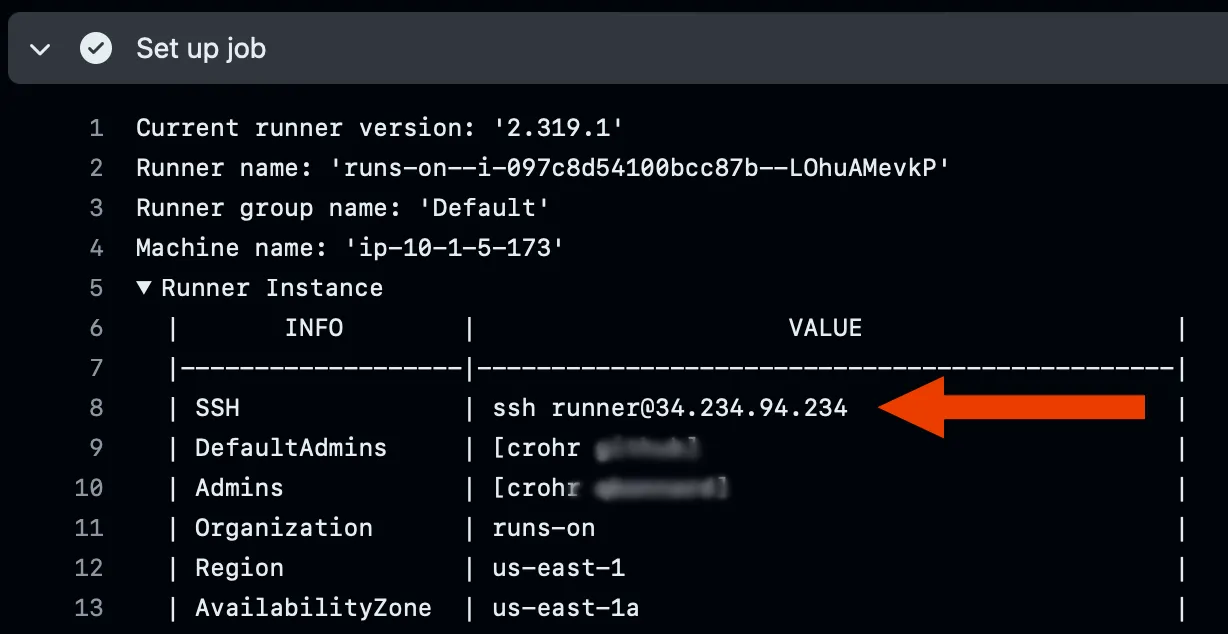
SSH access is off by default. It is enabled globally in the CloudFormation stack configuration, and per-job SSH daemon activation is governed by the ssh label in the job labels (default: ssh=false).
job: Test runs-on: runs-on=${{ github.run_id }}/runner=2cpu-linux-x64/ssh=trueSSH access instructions will be displayed into your workflow logs, under the “Set up job” section:
Fleet
Fleet does not let workflow authors toggle SSH from a workflow label. SSH is off by default (ssh_allowed = false). Set ssh_allowed = true to allow it, and restrict it with ssh_cidr_range (default 0.0.0.0/0).
When you supply existing security_group_ids, manage SSH ingress in those security groups instead of the Fleet module inputs.
Restricting SSH access to a specific network#
- For Flex, SSH access can be filtered to a specific network CIDR range, e.g. your company VPN.
- For Fleet, use
ssh_cidr_rangewhen the module creates security groups, or manage the same restriction in your existing security groups. - You can disable SSH globally with Flex
SSHAllowed=falseor Fleetssh_allowed = false.
Allowed SSH users#
By default, the first 5 direct collaborators on the repository with admin permission will have their public SSH keys (as declared in their GitHub settings) added to the runner.
For repositories with a higher number of collaborators, or to avoid having too many SSH keys populated on the runner, you might want to specify the list of admins yourself, in the RunsOn configuration file of the repository.
This configuration settings takes a list of GitHub usernames, whose SSH public keys will be added to the runner.
admins: - crohr - other-github-user