Flex vs Fleet
Choose the right RunsOn mode for your GitHub Actions runners on AWS.
RunsOn provides two ways to run ephemeral GitHub Actions runners in your AWS account: RunsOn Flex and RunsOn Fleet.
Flex lets each workflow describe the runner it needs. Fleet lets a platform team publish Terraform-managed runner fleets that workflows target by name.
You can deploy either mode or use both. Start with Flex when runner requirements vary by job. Choose Fleet when centralized ownership, GitHub runner scale sets, or a pull-based control plane matters. Both are production-ready; see what Fleet supports today for the differences.
Quick decision#
| If you want… | Choose |
|---|---|
| Each workflow to choose its CPU, RAM, architecture, image, storage, cache, or networking | Flex |
| A platform team to publish approved runner configurations through Terraform | Fleet |
| A pull-based GitHub scale-set control plane with no inbound webhook | Fleet |
GitHub strategy.max-parallel support for large matrix jobs | Fleet |
| Standard runner fleets for common jobs, with per-job flexibility for exceptions | Both |
Use both#
Use both when most jobs fit standardized runner fleets, but some jobs need an unusual or experimental configuration.
- Fleet publishes named runner fleets for common workloads such as Linux, Windows, GPU, build, or deployment jobs. The platform team reviews their shape, image, capabilities, networking, and capacity in Terraform.
- Flex handles exceptions that should remain workflow-owned, such as an unusual instance type, image, disk size, or temporary capability combination that the platform team has not published as a runner fleet.
Both modes use the same company-scoped license and launch runners in your AWS accounts. Their control planes and configuration remain separate, though they can share an AWS account and VPC.
Repositories can target Fleet by default and use Flex only when a job needs per-job control.
Shared capabilities, different ownership#
Many runner capabilities work in both modes. The main difference is who can change the runner configuration.
| Decision | Flex | Fleet |
|---|---|---|
| Runner shape and image | The workflow selects them per job, directly or through .github/runs-on.yml. | The platform team defines them in the Terraform runner catalog. |
| Magic Cache and tmpfs | The workflow opts in with extras labels. | The platform team adds extras to the runner definition. |
| Nested virtualization | The workflow adds the nested-virt label. | The platform team enables nested-virt on the runner definition. |
| Private networking | The stack enables it and eligible jobs select it through a label. | Terraform assigns networking to each runner fleet. |
| Workflow target | A label describes the runner, for example runs-on=${{ github.run_id }}/runner=2cpu-linux-x64. | A stable label names an approved runner fleet, for example runs-on/fleet=linux-small/env=production. |
Choose between Flex and Fleet primarily by ownership. Availability still depends on the mode, operating system, EC2 instance type, and stack configuration. See the runner capabilities matrix for current coverage and Flex concepts imported into Fleet for the Terraform mapping.
RunsOn Flex#
Workflow authors describe the runner each job needs. RunsOn provisions a dedicated ephemeral EC2 runner in your AWS account, which runs one job and then terminates.
Flex shines when:
- runner requirements vary from one job to another
- workflow authors need to choose the image, architecture, storage, networking, or extras
- workloads need broad access to EC2 families and runner sizes
- a one-off runner configuration does not justify a permanent platform catalog entry
How Flex is wired#
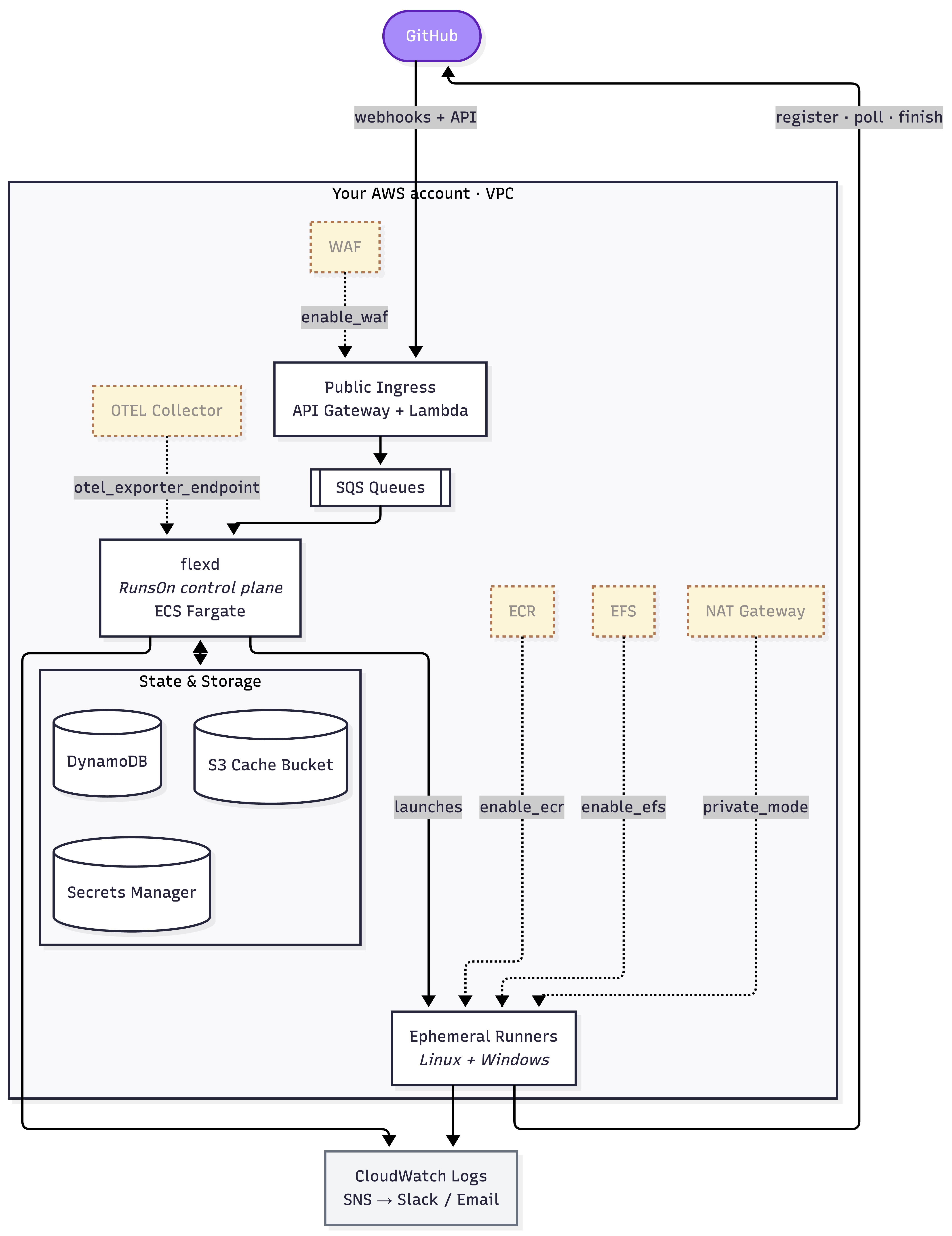
Flex runs in your AWS account and supports CloudFormation or Terraform /
OpenTofu installs. GitHub sends workflow_job webhooks through API Gateway and
Lambda. The ingress validates each event and places the work on SQS for the ECS
Fargate control plane.
The control plane provisions a dedicated EC2 runner for each job. The runner registers with GitHub, runs the job, and terminates. DynamoDB stores control-plane state, Secrets Manager stores GitHub credentials, and S3 provides cache and bootstrap storage. CloudWatch and SNS provide logs, dashboards, alerts, and reports.
When private runners are enabled, the built-in CloudFormation network creates private subnets, a NAT Gateway with a static egress IP, and an S3 gateway endpoint. Terraform / OpenTofu installs use the VPC, subnets, and egress path supplied by the platform team.
Start with the Flex installation guide.
RunsOn Fleet#
Platform teams define runner fleets in Terraform. Workflows target a stable fleet label, while Terraform owns the runner shape, image, networking, capacity, and GitHub runner-group assignment.
Like Flex, Fleet provisions an ephemeral EC2 runner for each job. The difference is that GitHub assigns the job to an approved runner scale set before RunsOn provisions capacity.
Fleet shines when:
- one platform team supports many repositories or GitHub organizations
- runner changes should go through Terraform review
- GitHub runner groups should control which workloads can use each runner fleet
- large matrices should honor GitHub
strategy.max-parallelbefore capacity launches - the control plane should operate without an inbound webhook endpoint
- one enterprise runner group should serve repositories across several GitHub organizations
Normal scale-set operation only needs self-hosted-runner management permissions.
Automatic reruns after Spot interruptions also require GitHub Actions read/write.
Set retry: false on a runner definition when you do not grant that permission.
How Fleet is wired#
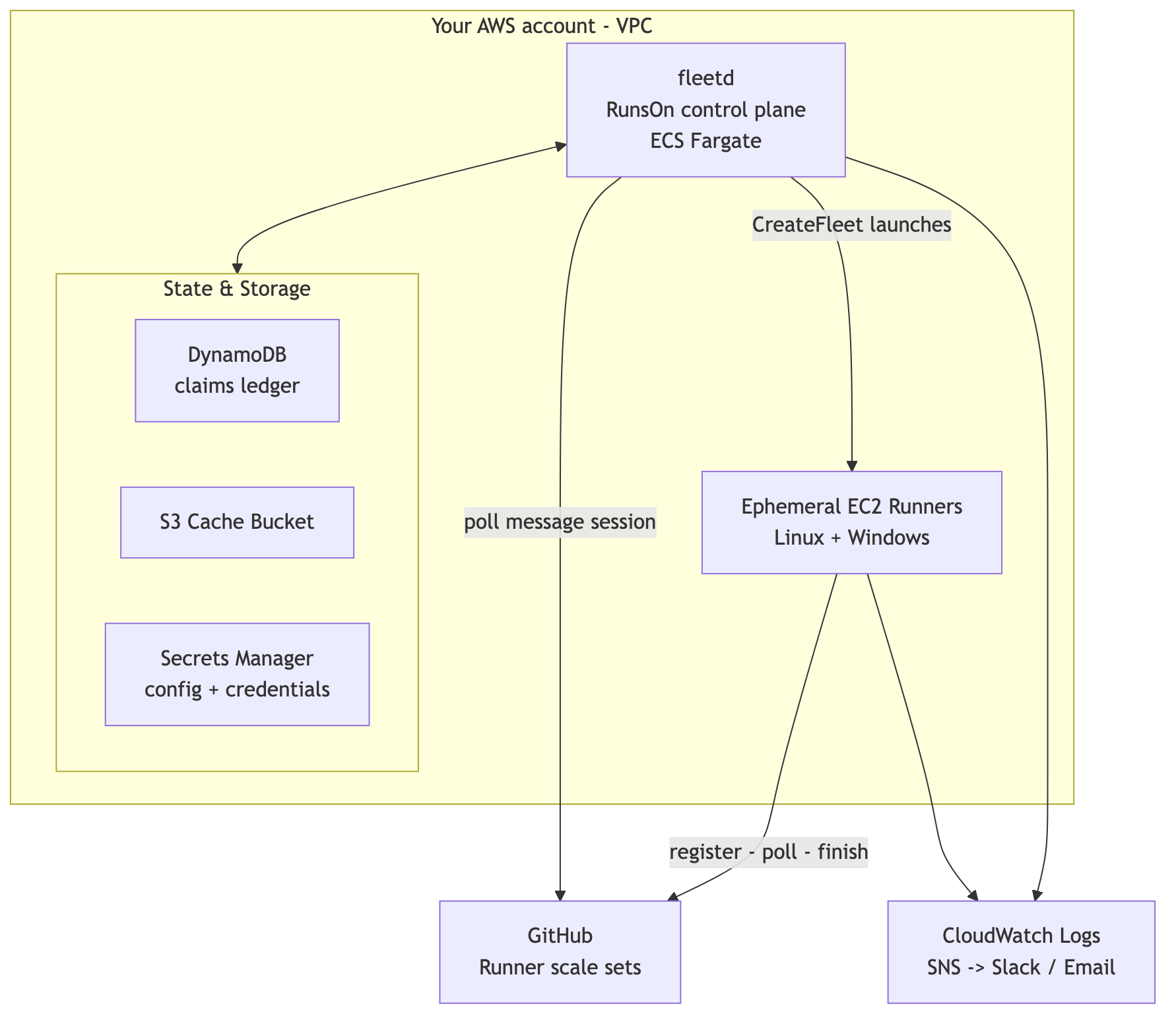
Fleet runs in your AWS account and is deployed with Terraform / OpenTofu. Its
fleetd control plane runs on ECS Fargate and uses a pull-based connection to
GitHub. There is no inbound webhook, API Gateway, or SQS queue in the demand
path.
Each runner fleet maps to one GitHub runner scale set attached to an existing
runner group. One Fleet runtime serves either one GitHub organization or one
enterprise boundary. fleetd maintains a message session with each scale set
and reacts only to jobs that GitHub assigns.
Fleet records durable capacity claims in DynamoDB. It stores cache data and runner bootstrap configuration in S3, and reads its runtime configuration and GitHub credentials from Secrets Manager. For each assigned job, Fleet uses ready hot or stopped standby capacity first, then launches a new Linux or Windows EC2 runner. The runner registers with its scale set, runs one job, and terminates.
Start with the Fleet installation guide.
What Fleet supports today#
Fleet is production-ready on Linux, Windows, and GPU runners. Pin an exact Terraform module version and review the upgrade notes before each rollout.
Runner shapes and capabilities live in Terraform. Each fleet can use Spot or On-Demand capacity and optional hot or stopped standby pools.
| Area | Available today |
|---|---|
| Caching and storage | Linux and Windows Magic Cache; Linux tmpfs; Linux and Windows local NVMe on compatible instance-store types; Linux and Windows sticky EBS disks; and a Linux ephemeral ECR registry for Docker images and BuildKit caches. |
| Networking and access | Public or private runner placement; static egress when private subnets route through a NAT Gateway with an Elastic IP; and SSM plus optional SSH on Linux and Windows. |
| Specialized runners | Custom AMIs, GPU runners, and x64 nested virtualization with Linux KVM or Windows Hyper-V. |
| AWS and registry integrations | Amazon Bedrock access and Docker Hub pull-through caching. Linux can use a transparent Docker mirror; Windows uses explicit ECR paths. |
| GitHub integrations | Organization or enterprise runner scale sets, strategy.max-parallel, Dependabot jobs for private repositories, and automatic Spot recovery when the GitHub credential has Actions read/write access. |
| Observability | Built-in per-job metrics and runner metadata, plus control-plane OTLP metrics, logs, and traces, with CloudWatch and SigNoz operator dashboards. |
See runner capabilities for the platform matrix and configuration guides.
Fleet deliberately keeps runner choices in Terraform, and it does not yet expose every Flex stack feature. Neither product currently supports macOS runners.
| Area | Fleet status | Use today |
|---|---|---|
| Per-job runner configuration | Workflows select a named fleet; they cannot override CPU, RAM, image, disk, networking, or extras. | Use Flex when each job must describe its own runner. |
| Shared EFS volumes | Fleet does not expose EFS mounts. | Use Flex shared EFS volumes for large shared working sets. |
| Runner-host OpenTelemetry | Fleet exports runner-host OTLP when its Terraform runner definition includes extras = ["otel"]. Workflows cannot enable it per job. | Configure the Fleet OTLP endpoint and add otel to each runner that should export. OTLP headers must use an ingestion-only credential that is safe for every runner in the stack. See Fleet observability. |
| Cost automation | Fleet supports cost-allocation tags, but not Flex’s daily budget alarm or email cost report. | Use AWS budgets and cost-allocation reporting for Fleet. |
| CLI operations | Fleet supports job diagnostics through roc logs; roc connect and roc interrupt remain primarily Flex tools. | See CLI product support. |
| Installation and boundary | Fleet is Terraform / OpenTofu only, and one stack manages one organization installation or one enterprise boundary. | Deploy a Fleet stack for each required boundary; use Flex when its CloudFormation path or webhook model is preferred. |
Licensing#
The same commercial license covers Flex and Fleet for the purchasing legal entity, across the GitHub organizations and AWS accounts it owns or controls. Affiliates are covered only when the applicable plan or order includes them.
Usage is the combined number of runner launches across both products each month. One launch normally corresponds to one GitHub Actions job. RunsOn does not automatically block jobs when usage exceeds a tier. After two consecutive calendar months above the threshold, RunsOn gives at least 15 days’ notice to reduce usage or move to the matching tier. A mid-term upgrade is prorated for the rest of the subscription term.
See Licensing and usage and current pricing.